Next Page helps readers, parents, and educators understand what’s inside a book, organize the books around them, and make informed reading decisions with clear book information and content insights.
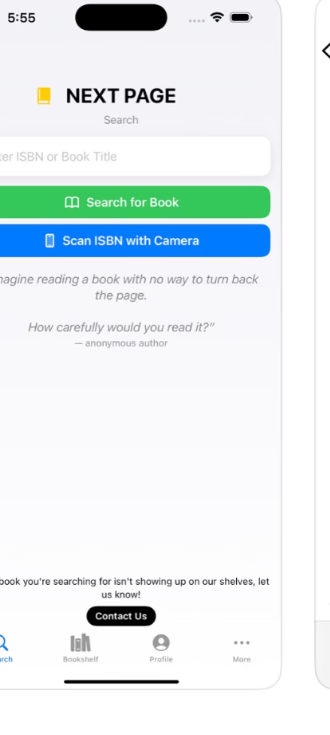
Search by title or scan a book’s ISBN, view professional book metadata and content insights, then save and organize books for yourself, your family, or your classroom.
Find a title manually or use the camera to scan a book’s ISBN.
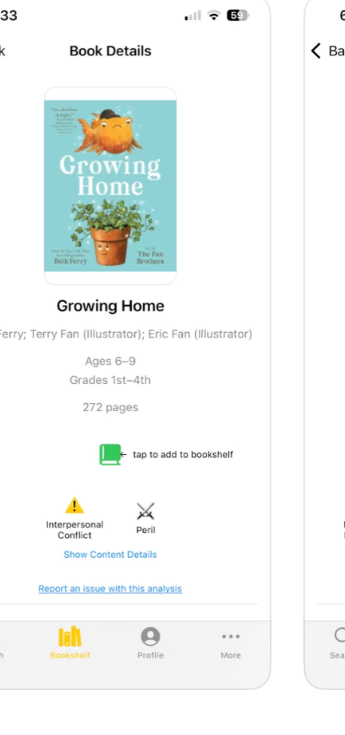
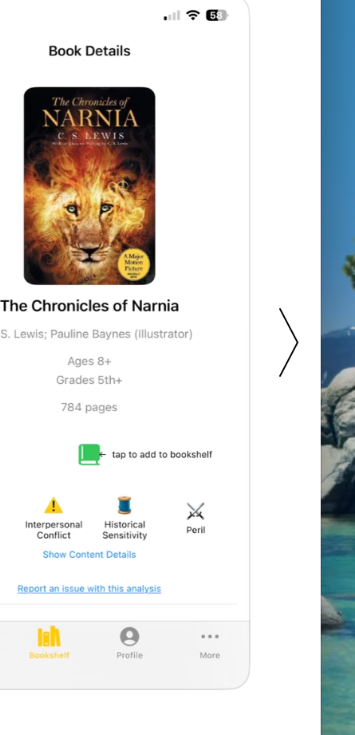
See age, grade, publisher information, subjects, descriptions, and content themes.
Save books to your bookshelf, track what you’ve read, and keep reading organized.
Build a useful picture of the books your family or classroom actually has and reads.
See useful metadata such as age, grade, pages, publisher information, and subjects.
Explore clear indicators and optional detail about themes and content that may appear in a title.
Next Page is designed to provide context and transparency so readers can make their own decisions.
Next Page goes beyond looking up a single book. Organize physical collections, track reading, and manage books for the people who actually use them.
Build personal and family bookshelves, create reader profiles, keep track of finished books, and bring useful book information into everyday reading.
Build and manage a classroom library, scan books into inventory, organize students, and track classroom checkouts and returns.
Next Page exists to make book information easier to understand and easier to use. We aim to give readers, parents, and educators better context around the books they’re considering while leaving the final choice where it belongs — with them.
Next Page brings useful book information and reading tools together in one place.
View Next Page on the App Store